
Click the For Business panel in the top profile above and select Hire on LinkedIn:

You will need to sign in to your profile again. Keep in mind that you personally will be considered the author of this job posting. Now you can add the job details.
Pay attention to the job title. It is the key to the success of your posting — it must be clear and contain the main benefit of your offer. In our case, the advantage is that the work can be done remotely. Another key is to be clear about the money.

Then you can preview your job posting and continue with the Next button.

In most cases, you would benefit by dropping Applicant questions - there are so many other job offers that your bureaucracy might discourage good applicants.
Now, the key point is that you will be notified about the applicants by email. Be careful; it may be easily missed or end in spam. Anyhow, LinkedIn will ask you here to verify your email once again.


There will also be an option to add this purple sticker to your profile picture. I wouldn't use it unless you are a recruiter, because it will look like your dominant agenda here on LinkedIn.

In most cases, LinkedIn job postings are free, which is a huge advantage compared to expensive specialised portals. To be specific, you can always have one free job posting per profile.
But if your posting is one of too many (you are also looking for IT people and salespeople), you may run into the problem shown above. LinkedIn won't let me post a sales position because there are too many other postings about it.

By entering the number 1 in the budget, I can check what the minimum possible budget is. My personal recommendation would be to pay as little as possible, because we have not seen any serious increase in the number of relevant applicants between free and paid postings.
You can still post for free by changing the job title or narrowing the geographic area of your search. The key is to reduce the competition.
A nice feature of a paid posting is the option to notify 25 relevant potential candidates about your offer.


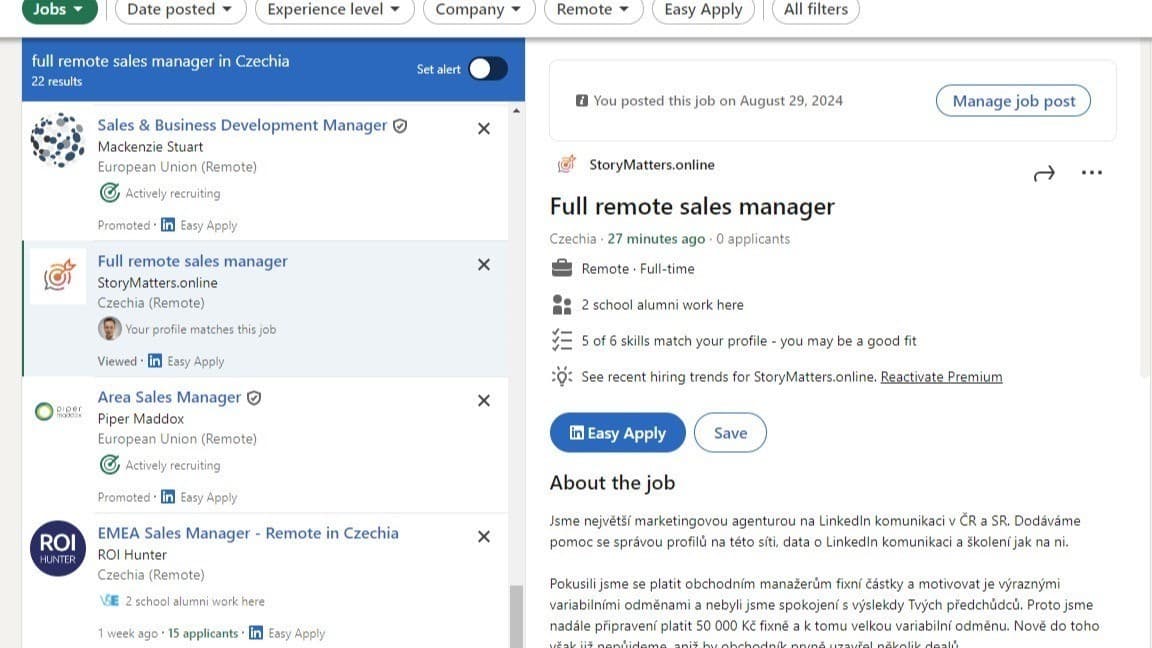
Your posting has now become public and is part of LinkedIn job search results.
If you need to edit it, delete it or review applicants, you can always find it here:


When looking at applicants, you may overlook many of them by not paying attention to the Rating button. LinkedIn does not show you the applicants it considers irrelevant, such as those from other regions.
Your applicant will also be notified by two emails: first, that their application went through, and second, that you have seen their application!

Be clear and fair about the job you are offering. I wish you great new colleagues!