
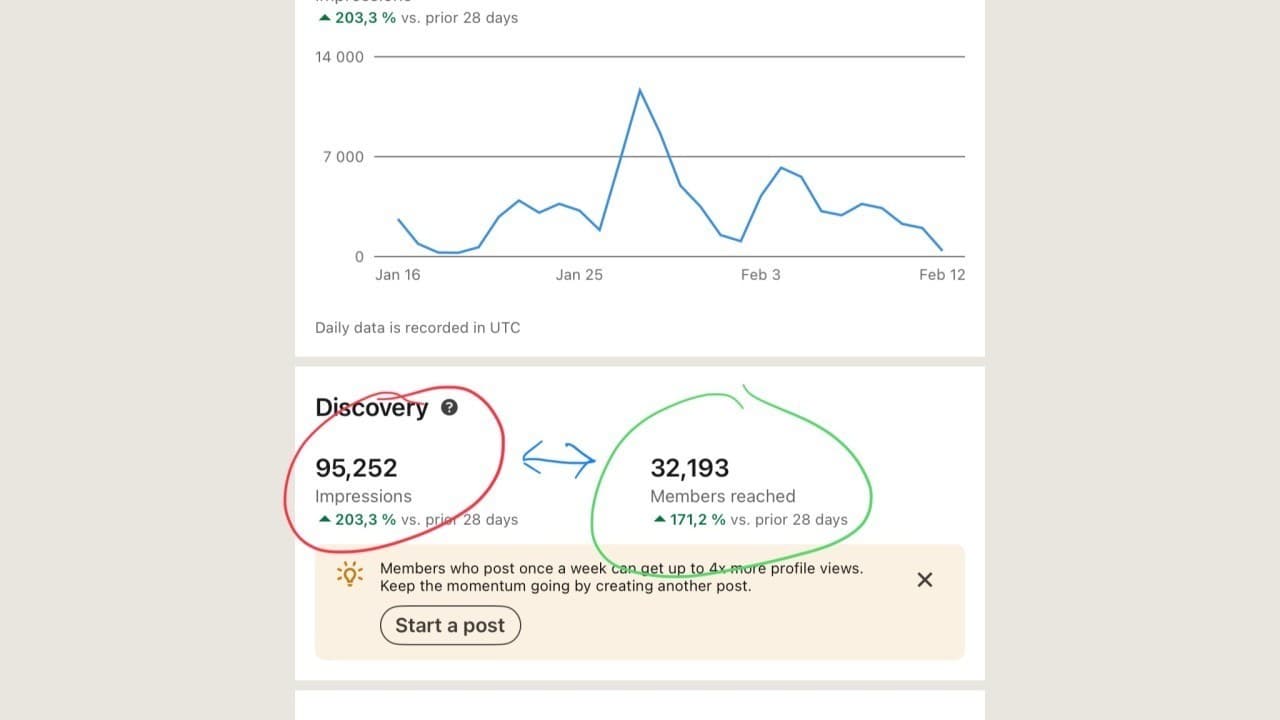
This feature was only recently added to LinkedIn, so some of you might not have it yet.
In your Analytics dashboard (on your personal profile), you'll find the Post impressions section – here's a direct link: https://www.linkedin.com/analytics/creator/content/?metricType=IMPRESSIONS&timeRange=past_7_days
Select data for the last 365 days. And here it comes:

I can see that posts reached 206,860 unique users.
This number was never there before – and thanks to it, we can now find out for the first time:
A typical follower saw my post about 6 times in the last year.
During this period, I published 223 posts (I got this from Klea).
That means you typically saw 1 out of every 37 posts.
During that year, I had about 23,000 followers, but I got my content to more than 180,000 people outside my followers.
Now let's look at the same data for the last 28 days:

During this period, I had about 26,500 followers – so the feedback is clear:
My content wasn't exactly viral.
Of course – not all followers are automatically counted among "Members reached".
If you're interested in understanding more deeply who's actually interested in you, I recommend checking out the Buyer Intent feature in Sales Navigator Advanced.
But let's stick with the free data for now.
For each of your posts, you can also see similar feedback – just click on the black number displayed below the post (view counts):

And here's the key feedback that most people overlook:
➡️ Impressions aren't from as many different people as you might think.
➡️ Many users saw your post multiple times!
If you're interested in detailed guides, processes, and game-changing strategies that work on LinkedIn, you might be interested in our Patreon account - https://www.patreon.com/Sergej_Storymatters